Inside My AI Agent Workflow: Claude Code, Cursor, and How I Actually Use Them
A practitioner's breakdown of how Claude Code and Cursor fit into a real development loop — planning, tool calls, verification, and where I still step in by hand.
Claude CodeCursorAI Agents
Key Takeaways
An AI coding agent's loop is: read the relevant code, propose a change, apply it, verify it — the same loop a careful human engineer follows, just faster at the reading and typing steps.
Claude Code is agent-first and CLI-native — good for larger, multi-file changes and running its own verification (build, browser checks) before handing back.
Cursor is IDE-integrated — good for tight, in-context edits where you want to watch and steer line by line.
Agents are strongest extending an existing pattern and weakest inventing a new one from scratch — for genuinely novel design, sketch the first version by hand, then hand off the repetition.
The highest-leverage habit either way: give the agent the constraints up front (existing patterns, tokens, breakpoints) instead of correcting it after the fact.
Most of the production sites on this portfolio — including this one — were built with an AI coding agent doing a large share of the typing. The tool matters less than the loop, but the tools do shape how that loop feels day to day.
The agent loop, stripped down
Read — the agent greps/reads the relevant files before touching anything, the same way a careful engineer would orient before editing unfamiliar code
Plan — for anything non-trivial, state the approach before writing code
Change — apply the edit, scoped as small as the task allows
Verify — run the build, check the browser at the breakpoints that matter, read the diff back
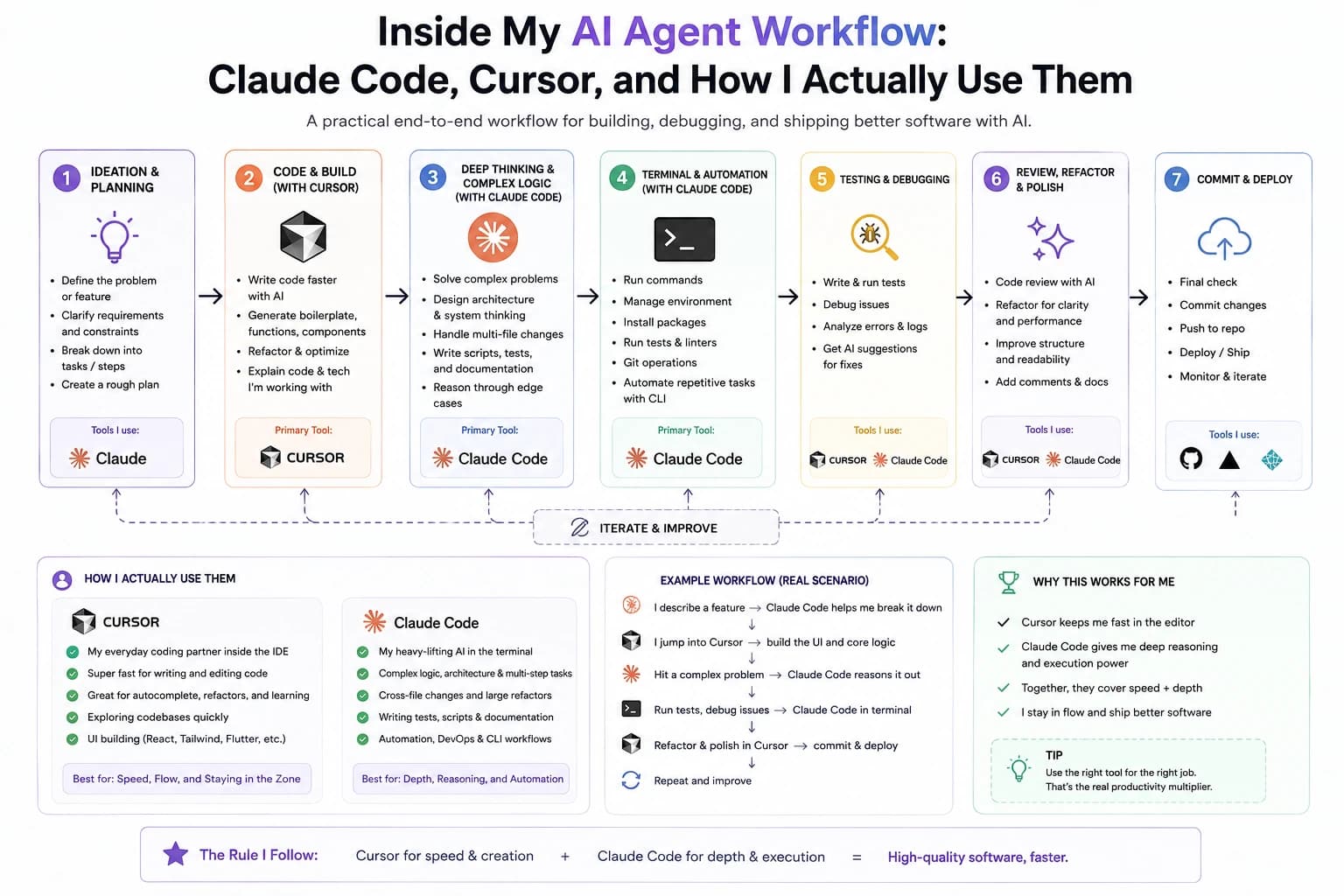
The full loop end to end — Cursor for speed and flow, Claude Code for depth and execution.
npm run build
# then check at 375px / 768px / 1280px, light + dark, before calling it done
Claude Code vs. Cursor, in practice
Claude Code lives in the terminal and is built agent-first: it can plan a multi-file change, execute it, and run its own verification (builds, browser checks, screenshots) before handing control back. That makes it strong for larger, cross-file work — a new page, a data-model change that touches five components, a full section redesign.
Cursor lives inside the editor, so edits stay visible line-by-line as they happen. That's better suited to tight, local changes where I want to watch the diff form in real time rather than review it after the fact — a single component's styling, a targeted bug fix.
Where agents still fall short
Neither tool is magic, and the gaps matter as much as the wins. An agent that isn't told to stay scoped will happily "improve" a couple of nearby functions while fixing the one thing you actually asked for — which is why this repo's own CLAUDE.md has a rule that a requested change should stay just that change.
They're also much better at extending an existing pattern than inventing a new one. Point either tool at a component that already exists five times in the codebase and ask for a sixth, and it nails it. Ask for something with no precedent in the repo — a layout or interaction nobody has built here before — and the output needs far heavier editing before it's usable.
Context also doesn't fully survive between sessions. A context file recovers the big picture at the start of a new one — stack, conventions, current priorities — but not the small stuff: a debugging path already ruled out, the reasoning behind a decision made minutes before the session ended. Some of that has to be re-established by hand.
A routine that actually works
In practice the split comes down to the size of the change, not loyalty to one tool. Anything that touches several files — a new page, a shared component's props changing everywhere it's used, a data-model update — goes to an agent that can read broadly, plan the whole change, and verify it before handing back.
Anything I want to watch happen line by line — tuning one component's spacing, chasing a single bug — stays in the editor, where the diff forms in front of me instead of arriving as a finished patch.
And for genuine one-liners — a typo, an import path, a stray console.log — neither tool is worth invoking. Opening an agent for a single keystroke change is more overhead than the change itself.
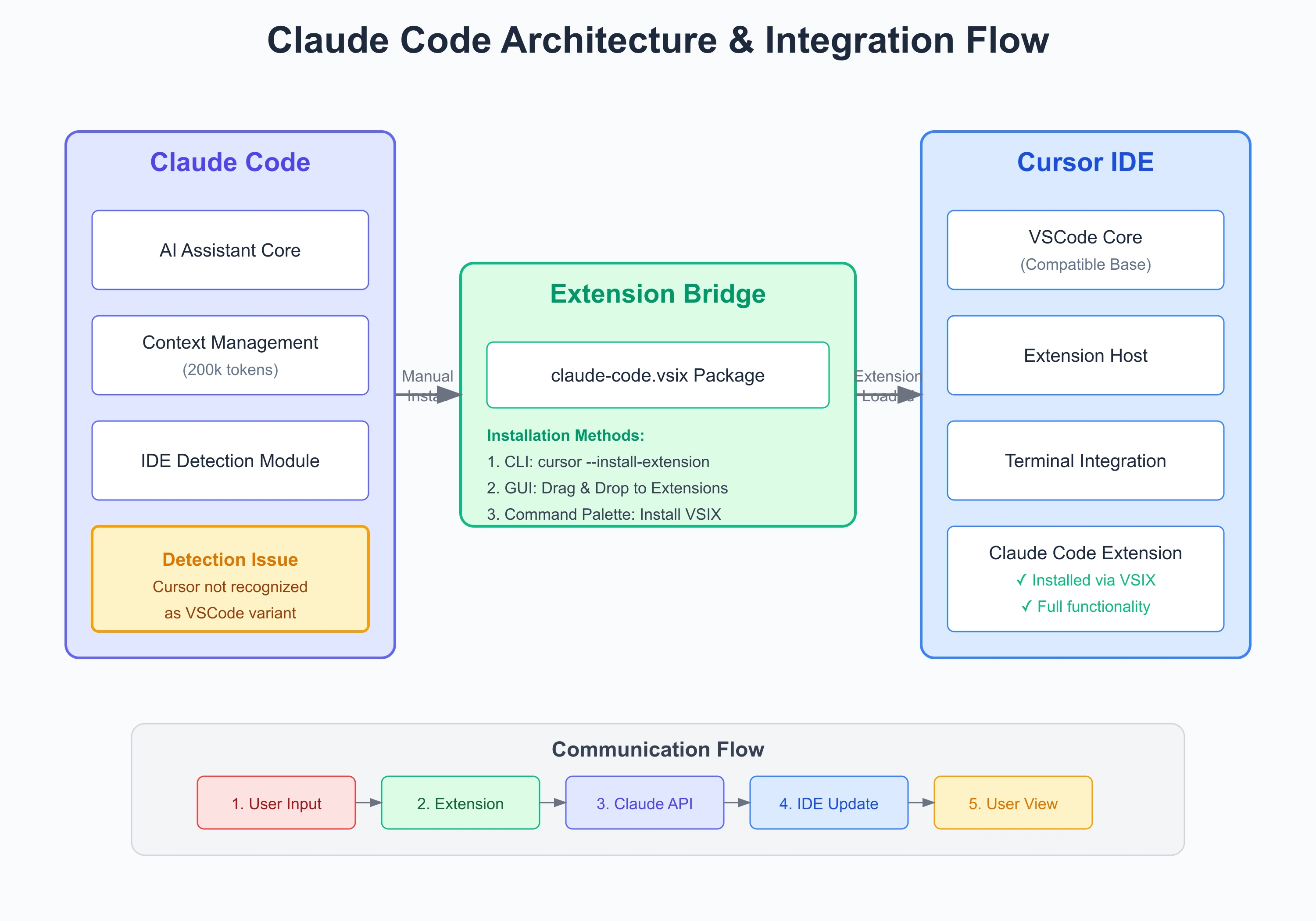
Same request/response loop under the hood, whichever editor it's running in.
The single habit that improves agent output the most: front-load the constraints (existing tokens, breakpoint conventions, component patterns already in the codebase) instead of describing the feature in isolation and fixing the mismatches afterward.